Development Collaboration Workflow
Code Style
The engine project uses eslint and stylelint. Code style is checked on every git commit. If there are errors, fix them before committing. (Do not use -n to skip hooks — GitHub workflow lint checks will still catch you. Give up, young one~)
Testing
Before each commit, run unit tests locally and only submit your MR after they pass.
If you add new functionality, add corresponding unit tests. Core engine modules currently have 80%+ unit test coverage. Lowering coverage will cause the change to be rejected.
Running unit tests:
- Run
npm run buildat the project root - If you changed only one package, e.g. designer, run
npm testin that package directory - (Or) If you changed multiple packages, run
npm testat the root
Commit Style
Requirements:
Commit messages must follow Conventional Commits
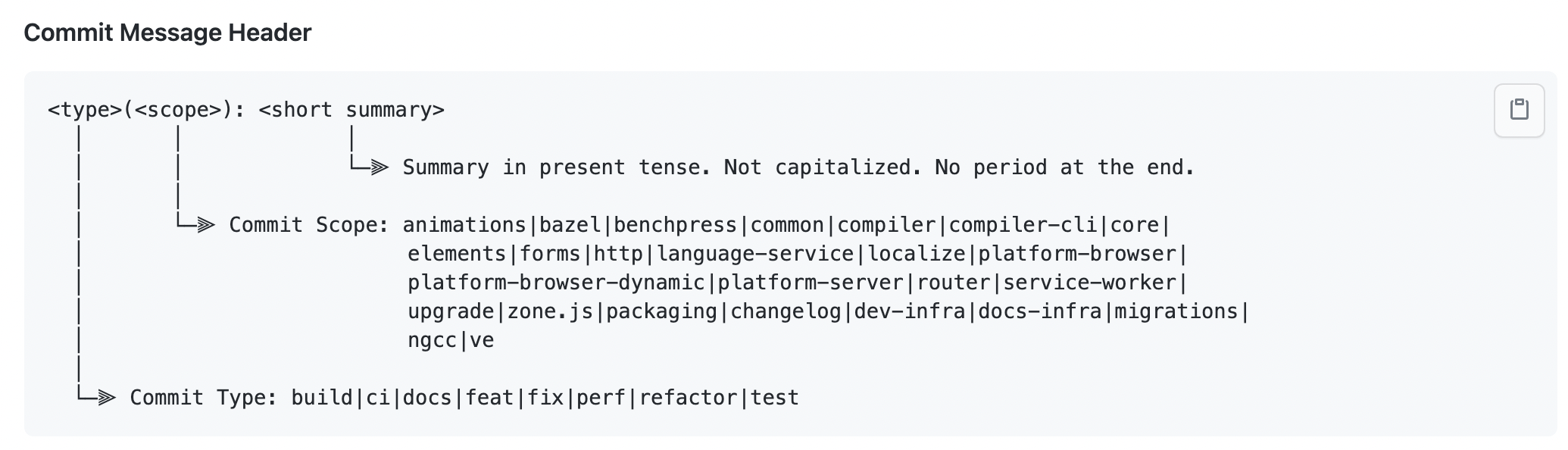
One bugfix / feature per commit. If not, rebase before submitting your MR — avoid piles of useless or experimental commits.
Benefits: The engine's commit history stays clear — each commit does one definite thing, and the changelog can be generated automatically. If a commit introduces a bug, it is also easy to fix quickly via rebase drop and similar approaches.
Branch Usage
- main: The most stable branch; matches npm
latestpackages - develop: Development branch with the latest verified features and bugfixes; the target branch for Pull Requests
- release branches
- Official release branches named
release/x.y.z, usually cut from develop for release;x.y.zis the version to publish - Beta release branches named
release/x.y.z-beta(\.\d+)?for quick validation and npm beta publishes
- Official release branches named
After beta validation, beta release branches often contain useless commits (e.g. lerna package.json changes), so they are not merged directly into develop. Instead, branch from develop, cherry-pick useful commits from the beta release branch onto the new branch, then open a PR to develop.
Engine Release Process
For day-to-day work, branch from develop, self-test and pass unit tests, then open a PR to develop. The release owner cuts a release/1.0.z branch from develop~
Version Planning
This is the ideal cadence; actual timing may vary
- Regular iteration every 2 weeks, usually mid-month or end of month. The last beta goes out two days before release day; new PRs are generally not accepted. After a 2-day gray period, the stable release ships.
- Emergency iterations can ship at any time
- Major feature releases, 2–4 times per year
Release Steps
Publishing requires permissions. If you need a release soon after your PR is merged, you can join the contributor discussion group.
Stable Release
Steps (example: releasing version 1.0.0):
- git checkout develop
git checkout develop - Create the release branch
git checkout -b release/1.0.0 - build
npm run build - Publish to npm
npm run pub - Sync to tnpm, alifd CDN, and uipaas CDN (this syncs npm packages to Alibaba's internal registry; alifd CDN depends on the internal npm source)
tnpm run sync
tnpm run syncOss - Update the release notes
- Merge
release/x.x.xinto main - Merge main into develop
For beta releases, steps (example: releasing version 1.0.1):
First beta for a minor (y) version, e.g. 1.1.0-beta.0
- Check out developPull latest if needed
git checkout developgit pull - Create the release branch; example for version 1.1.0
git checkout -b release/1.1.0-beta
git push --set-upstream origin release/1.1.0-beta - build
npm run build - Publish; requires
@alilcscope publish permissionnpm run pub:preminor - Sync to tnpm, alifd CDN, and uipaas CDN
tnpm run sync
tnpm run syncOss
First beta for a patch (z) version, e.g. 1.0.1-beta.0
- Check out developPull latest if needed
git checkout developgit pull - Create the release branch; example for version 1.0.1
git checkout -b release/1.0.1-beta
git push --set-upstream origin release/1.0.1-beta - build
npm run build - Publish; requires
@alilcscope publish permissionnpm run pub:prepatch - Sync to tnpm, alifd CDN, and uipaas CDN
tnpm run sync
tnpm run syncOss
Non-first beta for a version, e.g. 1.0.1-beta.0 -> 1.0.1-beta.1
- Switch to the release branch
git checkout release/1.0.1-beta - Rebase onto latest develop
git rebase origin/develop - build
npm run build - Publish; requires
@alilcscope publish permission command differs from first betanpm run pub:prerelease - Sync to tnpm, alifd CDN, and uipaas CDN
tnpm run sync
tnpm run syncOss
DEMO Release Process
- Update the version Manually update the version in package.json
- build
npm run build - publish (requires npm publish permission)For beta:
npm run pubnpm publish --tag beta - Sync to tnpm, alifd CDN, and uipaas CDN
tnpm run sync
tnpm run syncOss
Site goes live The demo version must be updated through Alibaba's internal systems for the official site to reflect the change.