8. Data Source Panel Details
🪚 Overview
The data source panel manages remote data sources in low-code. It edits the data source Schema in the low-code protocol visually. Together with the Data Source Engine, it supports producing and consuming data sources in low-code.
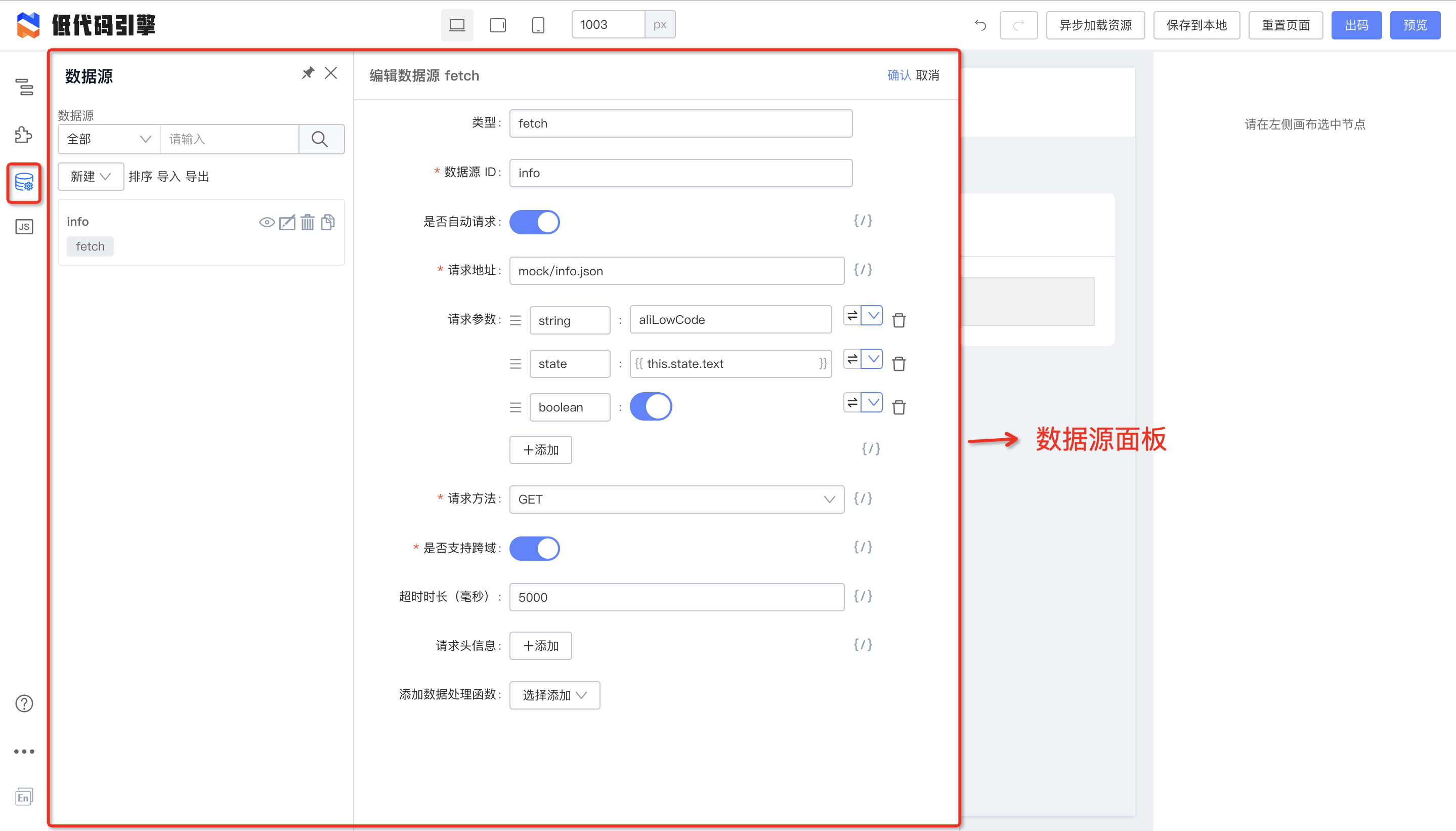
Data source panel
❓ How to use
The panel supports creating, deleting, editing, sorting, importing/exporting, copying, and searching data sources. Built-in remote request types include
fetchandJSONP.
Create a data source in three steps
 Create a data source in three steps
Parameter reference
TODO
☠️ More details
Data source order
Data sources can be ordered because load order matters. See the protocol and implementation layers for how order is defined.
TODO
Custom data sources
Custom data source types (design time)
Custom request handlers (runtime)
Customize the request handler when:
- The default
handlerdoes not meet your needs- You added a custom type such as
GraphQLand need a matchinghandler
Example: implementing a handler
import { RuntimeOptionsConfig } from '@rchh/lowcode-datasource-types';

import request from 'universal-request';
import { RequestOptions, AsObject } from 'universal-request/lib/types';

export function createFetchHandler(config?: Record<string, unknown>) {
  return async function(options: RuntimeOptionsConfig) {
    const requestConfig: RequestOptions = {
      ...options,
      url: options.uri,
      method: options.method as RequestOptions['method'],
      data: options.params as AsObject,
      headers: options.headers as AsObject,
      ...config,
    };
    const response = await request(requestConfig);
    return response;
  };
}
Default low-code fetch-handler implementation
The built-in fetch-handler uses universal-request. If your team uses axios, you can reimplement it entirely:
import axios from 'axios';
export function createAxiosFetchHandler(config?: Record<string, unknown>) {
  return async function(options: RuntimeOptionsConfig) {
    const requestConfig: RequestOptions = {
      ...options,
      url: options.uri,
      method: options.method as RequestOptions['method'],
      data: options.params,
      headers: options.headers,
      ...config,
    };
    const response = await axios(requestConfig);
    return response;
  };
}
Register with render
After implementing a handler, wire it into render or code generation:
Render
import React, { memo } from 'react';
import ReactRenderer from '@rchh/lowcode-react-renderer';

const SamplePreview = memo(() => {
  return (
    <ReactRenderer
      className="lowcode-plugin-sample-preview-content"
      schema={schema}
      components={components}
      appHelper={{
        requestHandlersMap: {
          fetch: createAxiosFetchHandler(),
        },
      }}
    />
  );
});
Code generation
Custom handlers currently require redefining types. We plan to add
requestHandlersMapmapping for code generation. Contact Rongbin (github-id: xingmolu) if you need this.
Enable the data source engine at design time
By default the data source engine is off in the designer. Pass
requstHandlersMapwhen initializing the designer:
import { init, plugins } from '@rchh/lowcode-engine';
import { RequestHandlersMap } from '@rchh/lowcode-datasource-types';

const preference = new Map();

(async function main() {
  await plugins.register(scenarioSwitcher);
  await registerPlugins();

  init(document.getElementById('lce-container')!, {
    // designMode: 'live',
    // locale: 'zh-CN',
    enableCondition: true,
    enableCanvasLock: true,
    // Bind variables by default
    supportVariableGlobally: true,
    // simulatorUrl is not required when it shares the same parent path as engine-core.js!!!
    // Here we use the alifd CDN, so engine-core.js and react-simulator-renderer.js are on different paths
    simulatorUrl: [
      'https://alifd.alicdn.com/npm/@rchh/lowcode-react-simulator-renderer@latest/dist/css/react-simulator-renderer.css',
      'https://alifd.alicdn.com/npm/@rchh/lowcode-react-simulator-renderer@latest/dist/js/react-simulator-renderer.js'
    ],
    requestHandlersMap: {
      fetch: createAxiosFetchHandler()
    }
  }, preference);
})();
🥡 Appendix
Data source protocol
| Parameter | Description | Type | Variable support | Default | Notes |
|---|---|---|---|---|---|
| id | Request ID | String | - | - | |
| isInit | Initial data request | Boolean | ✅ | true | When true, the request runs automatically on component mount |
| isSync | Run serially | Boolean | ✅ | false | When true, this request runs serially |
| type | Request type | String | - | fetch | fetch / mtop / jsonp / custom |
| shouldFetch | Whether this request may run | (options: ComponentDataSourceItemOptions) => boolean | - | () => true | See ComponentDataSourceItemOptions |
| willFetch | Pre-request options transform | Function | - | options => options | Single options argument; return value becomes request options. On error, original options are used. May return a Promise |
| requestHandler | Custom external request handler | Function | - | - | Only when type='custom' |
| dataHandler | Success callback | Function | - | response => response.data | Receives the resolved promise value |
| errorHandler | Error callback | Function | - | - | Receives the rejected promise error |
| options {} | Request options | ComponentDataSourceItemOptions | - | - | Per type; see ComponentDataSourceItemOptions |