Setters overview
Display area
Setters appear on the right side of the editor:
 Tabs include Properties, Style, Events, and Advanced.
- Properties: common material properties
- Style: style-related properties
- Events: when the material declares events, bind them here
- Advanced: conditional rendering and loop
Setters
Each configuration field uses a setter—for text use a string setter, for numbers a number setter, and so on.
The title and button type fields below use a string setter and a select setter.
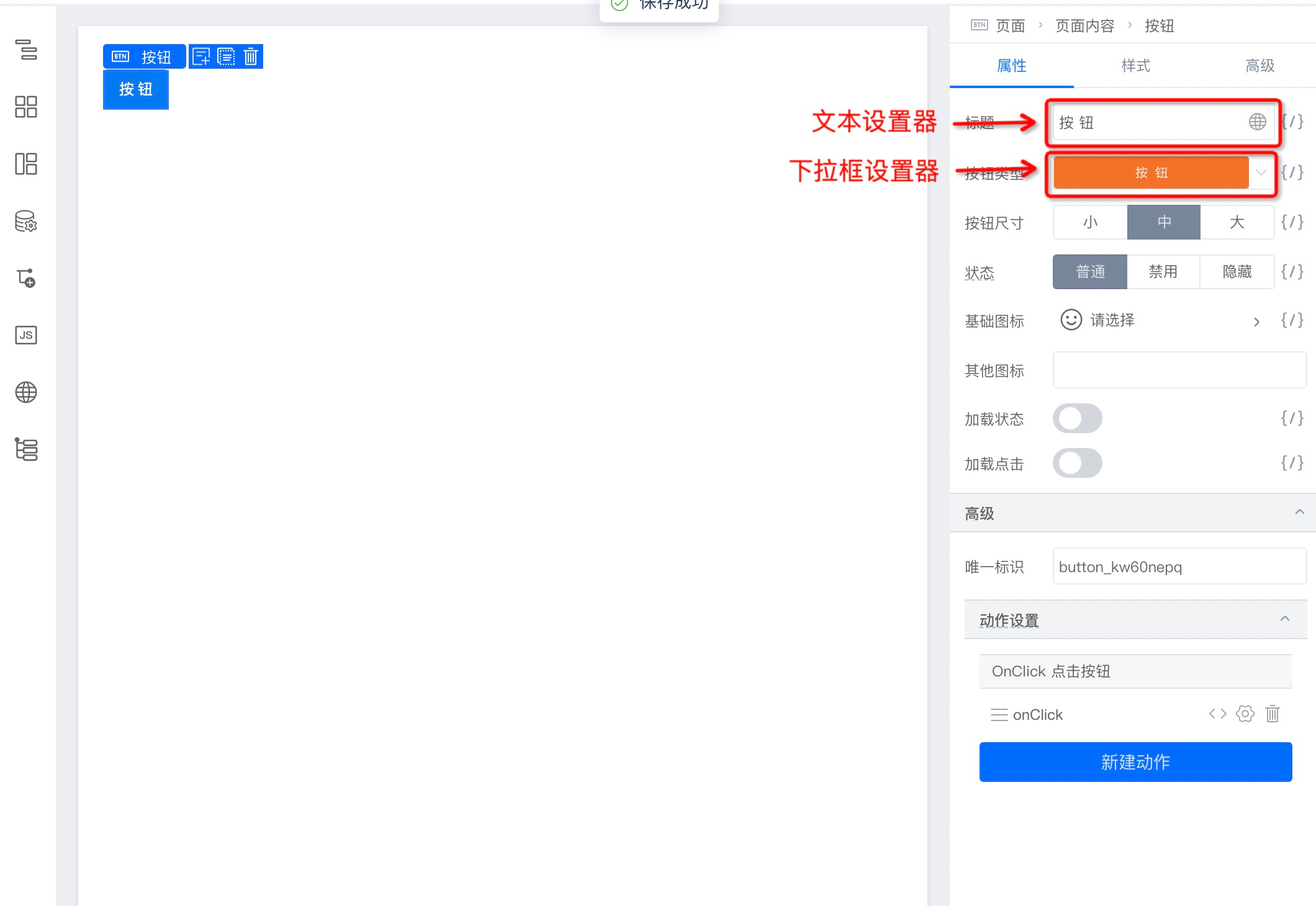 Built-in setters cover common cases; you can also build custom setters.
Built-in setters
| Preset Setter | Purpose |
|---|---|
| StringSetter | Short single-line text |
| NumberSetter | Numeric values |
| BoolSetter | Boolean values |
| SelectSetter | Enum via dropdown |
| VariableSetter | Variable binding |
| RadioGroupSetter | Enum via tab/radio group |
| TextAreaSetter | Multi-line text |
| DateSetter | Date |
| TimePicker | Time |
| DateYearSetter | Year |
| DateMonthSetter | Month |
| DateRangeSetter | Date range |
| EventsSetter | Event binding |
| ColorSetter | Color |
| JsonSetter | JSON |
| StyleSetter | CSS styles |
| ClassNameSetter | Class names |
| FunctionSetter | Functions |
| MixedSetter | Mixed types |
| SlotSetter | Node/slot content |
| ArraySetter | Array/list rows |
| ObjectSetter | Object fields; often nested in ArraySetter |
Custom setters
Writing AltStringSetter
A simple custom setter example:
import * as React from 'react';
import { Input } from '@alifd/next';

import './index.scss';
interface AltStringSetterProps {
  // current value
  value: string;
  // default value
  defaultValue: string;
  // setter sole output
  onChange: (val: string) => void;
  // AltStringSetter special config
  placeholder: string;
}
export default class AltStringSetter extends React.PureComponent<AltStringSetterProps> {
  componentDidMount() {
    const { onChange, value, defaultValue } = this.props;
    if (value == undefined && defaultValue) {
      onChange(defaultValue);
    }
  }

  // Declare Setter title
  static displayName = 'AltStringSetter';

  render() {
    const { onChange, value, placeholder } = this.props;
    return (
      <Input
        value={value}
        placeholder={placeholder || ''}
        onChange={(val: any) => onChange(val)}
      ></Input>
    );
  }
}
Setter and plugin communication
Use emit for cross-setter communication. Register in setter A:
import { event } from '@ali/lowcode-engine';

componentDidMount() {
        // Because the panel may have multiple setters, use field.id to mark the setter name
    this.emitEventName = `${SETTER_NAME}-${this.props.field.id}`;
    event.on(`${this.emitEventName}.bindEvent`, this.bindEvent)
}

bindEvent = (eventName) => {
  // do someting
}

componentWillUnmount() {
  // Setters are instance-based; unregister events when a setter is disposed to avoid event pool growth
  event.off(`${this.emitEventName}.bindEvent`, this.bindEvent)
}
Trigger from setter B:
import { event } from '@ali/lowcode-engine';

bindFunction = () => {
  const { field, value } = this.props;
  // Shows communicating with a plugin; event naming is pluginName + method
  event.emit('eventBindDialog.openDialog', field.name, this.emitEventName);
};
Updating sibling props
A setter only updates one prop. To change siblings, use the field's parent:
bindFunction = () => {
  const { field, value } = this.props;
  const propsField = field.parent;
  // Get sibling prop showJump value
  const otherValue = propsField.getPropValue('showJump');
  // Set sibling prop showJump value
  propsField.setPropValue('showJump', false);
};
Register AltStringSetter
Register the setter with the engine so materials can reference it by name:
import AltStringSetter from './AltStringSetter';
import { setters } from '@rchh/lowcode-engine';
setters.registerSetter({
  AltStringSetter: {
    component: AltStringSetter,
  },
});
Use in materials
Point the prop to the setter in the asset config, e.g. packages/demo/public/assets.json:
Core configuration:
{
  "props": {
    "isExtends": true,
    "override": [
      {
        "name": "type",
        "setter": "AltStringSetter"
      }
    ]
  }
}
Full material example:
{
  "componentName": "Message",
  "title": "Message",
  "docUrl": "",
  "screenshot": "",
  "npm": {
    "package": "@alifd/next",
    "version": "1.19.18",
    "exportName": "Message",
    "main": "src/index.js",
    "destructuring": true,
    "subName": ""
  },
  "props": [
    {
      "name": "title",
      "propType": "string",
      "description": "Title",
      "defaultValue": "Title"
    },
    {
      "name": "type",
      "propType": {
        "type": "oneOf",
        "value": ["success", "warning", "error", "notice", "help", "loading"]
      },
      "description": "Feedback type",
      "defaultValue": "success"
    }
  ],

  "configure": {
    "props": {
      "isExtends": true,
      "override": [
        {
          "name": "type",
          "setter": "AltStringSetter"
        }
      ]
    }
  }
}
Summary
This chapter covered what setters are, built-in setters, and how to build a custom setter when built-ins are not enough.