Code Generation Module Design
This article explains the basic ideas and concepts behind the code generation module. To integrate code generation or customize a code generation solution, see Using Code Generation.
npm packages and repositories
| NPM package | Repository | Description |
|---|---|---|
| @rchh/lowcode-code-generator | alibaba/lowcode-engine (subdirectory: modules/code-generator) | Core code generation library; runs in Node and provides a standalone mode for browsers |
| @alilc/lowcode-plugin-code-generator | alibaba/lowcode-code-generator-demo | Code generation example — browser-side code generation plugin |
Code generation module principles
Input and output of the code generation module are simple:
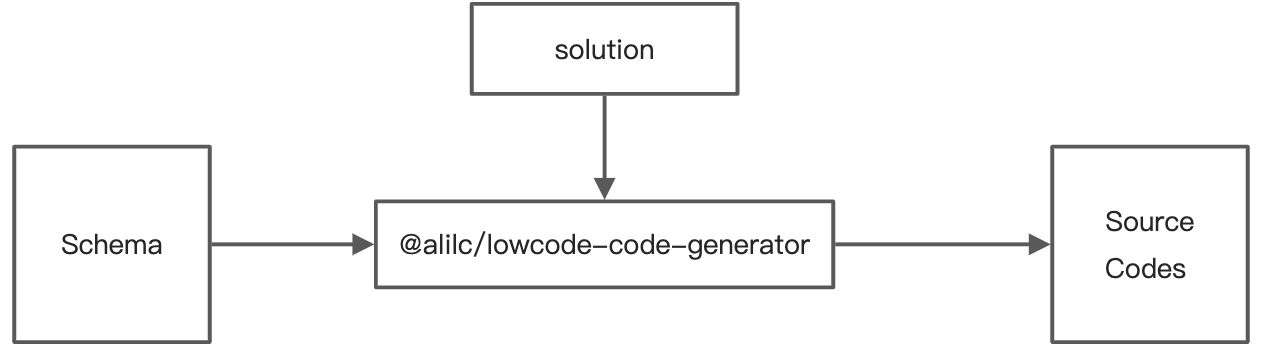
Key concepts:
- schema: building protocol content—a schema that conforms to the Alibaba Mid/Back-Office Frontend Building Protocol Specification
- solution: code generation solution—the specific project framework (e.g. Rax, Ice.js)
- Source Codes: generated source code, described as a directory tree
This is a module with little user interaction that completes the full pipeline through a fixed flow. Its core exposes a function that converts a building protocol schema into code according to a given solution. For users, it is a black box with deterministic input and output.
Code generation flow overview
The code generation module is similar to a compiler: both transform one representation of code into another.
Compiler flow

Code generation module flow

Code generation flow in detail
Protocol parsing
Protocol parsing converts the input schema into a data structure better suited for internal use in the code generation module, so later code generation can use that data directly without repeated parsing.

Main steps:
- Parse third-party component dependencies
- Analyze ref API usage
- Build dependency indexes between containers
- Analyze component dependencies within containers
- Analyze route configuration
- Analyze utils and npm package dependencies
- Other compatibility handling
Pre-optimization
Pre-optimization applies strategy-based optimizations to the schema.
The logic splits into analysis, rules, and optimization, combined into a strategy pack that supports some customization via configuration. Each strategy pack runs analyzers first to extract features from input, then uses rules to decide whether to run optimization actions:

Code generation
The code generation flow is as follows:
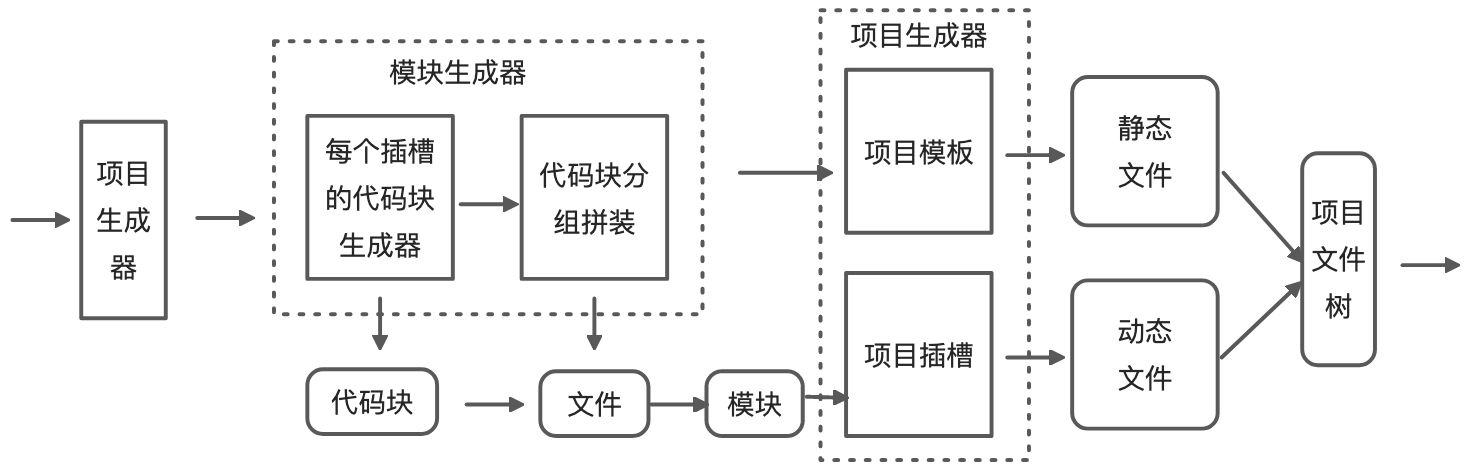
Naively concatenating strings to generate source code would be hard to extend and maintain, so the code generation module abstracts code during generation.
In daily development, we often use a specific project framework and place configuration, UI code, and logic where they belong, eventually forming a runnable business system. Code generation can be broken down the same way: project -> slot -> module -> file -> code chunk (code fragment). That turns complex project output into focused, single-purpose code chunk generation problems, while supporting composition and reuse.
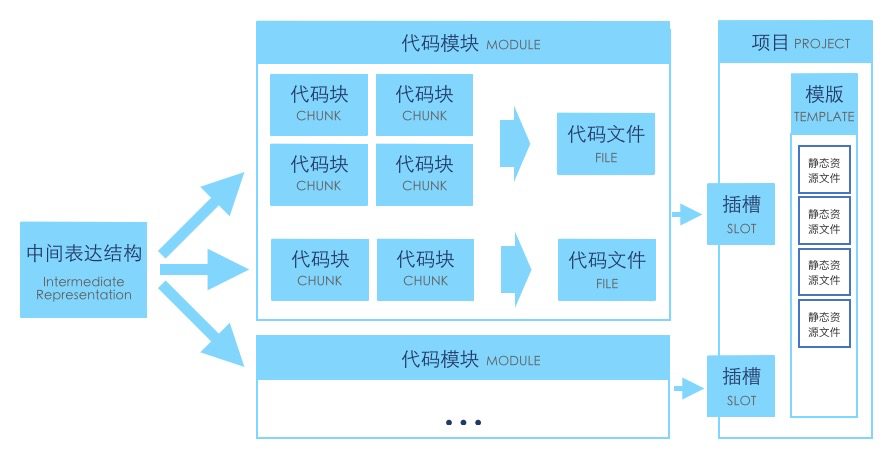
Note: the intermediate representation is the structured output after schema parsing.
Slots
Slots describe the relative path of the corresponding module in the project and can apply fixed naming. Each slot has a set of plugins to produce code. One or more generated files are placed in the project according to the slot description.
// Project template
export interface IProjectTemplate {
  slots: Record<string, IProjectSlot>;
}

// Slot
interface IProjectSlot {
  path: string[];
  fileName?: string;
}

// Slot code generation plugin configuration
interface IProjectPlugins {
  [slotName: string]: BuilderComponentPlugin[];
}
Code chunks
A code chunk is the smallest unit of code generation output, produced by code generation plugins. Multiple code chunks are assembled into code files. Each code chunk describes itself with name and uses linkAfter to describe which named chunks it should follow.
interface ICodeChunk {
  type: ChunkType; // Processing type ast | string | json
  fileType: string; // File type js | css | ts ...
  name: string; // Code chunk name; related to linkAfter
  subModule?: string; // File name within module; default is index
  content: ChunkContent; // Code chunk content; format depends on type
  linkAfter: string[];
}
Post-optimization
Post-optimization has file-level and project-level variants:
- File-level: processed after a single file is generated
- Project-level: processed after all files are generated
File-level post-optimization currently mainly uses prettier for code formatting.