Setter Design
Setters are an important way for material properties to interact with users. They play a vital role in day-to-day editor use. This article focuses on setter design principles and usage to help you understand setters better.
In the right area of the editor, setter blocks appear as shown below:
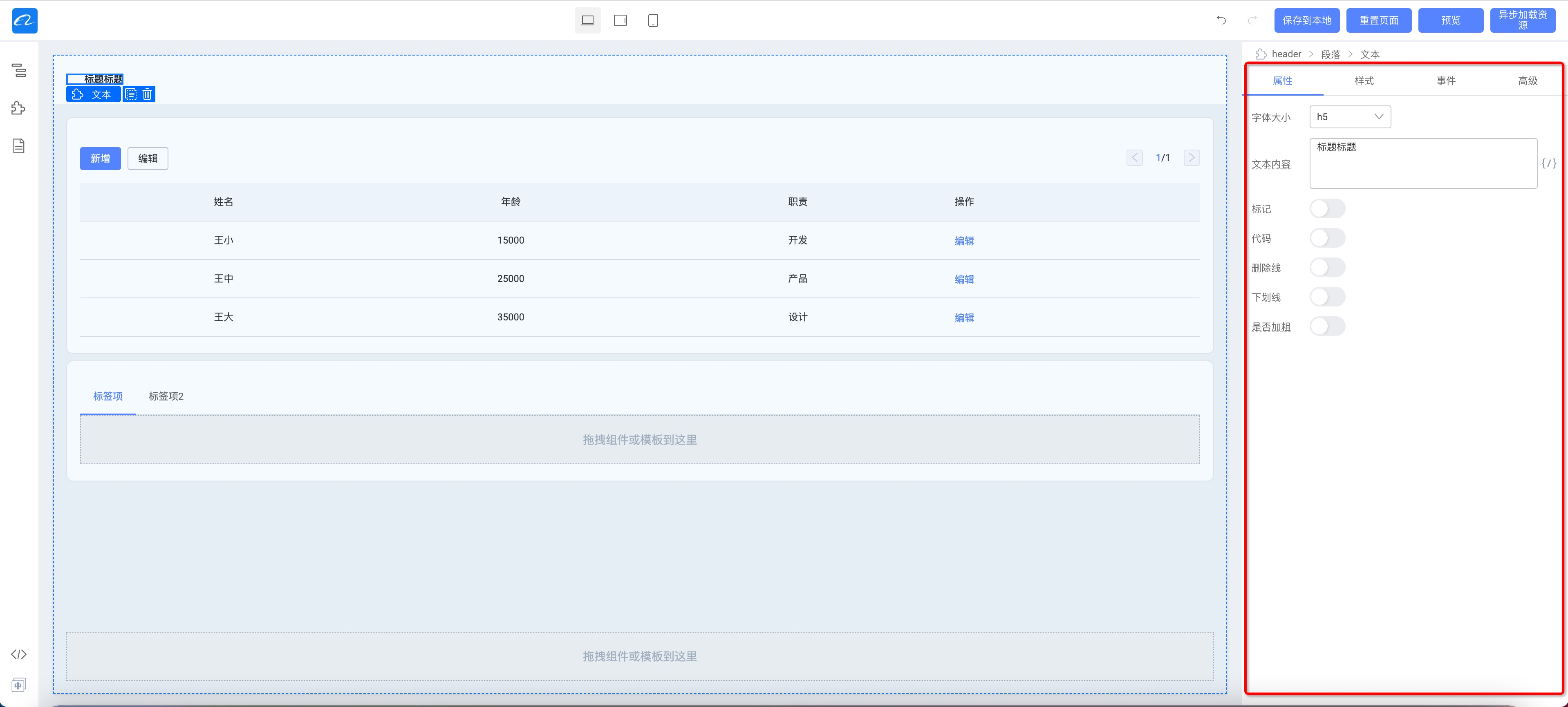
They include Properties, Style, Events, and Advanced:
- Properties: shows the material's regular properties;
- Style: shows the material's style properties;
- Events: if the material declares events, an events panel appears for binding events;
- Advanced: two logic-related properties, conditional rendering and loop.
npm package and repository
- npm package: @rchh/lowcode-engine-ext
- Repository: https://github.com/alibaba/lowcode-engine-ext
Setter module principles

The settings panel depends on three abstractions:
- Editor context
editor, mainly including: message notifications, plugin references, etc. - Setting object
settingTarget, mainly including: selected nodes, whether values are the same, value storage, etc. - Setting field
settingField, mainly related to the current settings view, including the view'srefand setting objectsettingTarget
SettingTarget abstraction
If it is not multi-select, you can expose Node directly. When multi-select editing is involved, values are often different and need to be set in batch. This abstraction wraps that logic and hides multi-select complexity.
The setting object abstraction for selected nodes:
interface SettingTarget {
  // Nodes being configured, at least one
  readonly nodes: Node[];
  // All property value data
  readonly props: object;
  // Set a property value
  setPropValue(propName: string, value: any): void;
  // Get a property value
  getPropValue(propName: string): any;
  // Set multiple property values, replacing existing values
  setProps(data: object): void;
  // Set multiple property values, merging with existing values
  mergeProps(data: object): void;
  // Bind when property values change
  onPropsChange(fn: () => void): () => void;
}
The setting target property abstraction derived from the setting object:
interface SettingTargetProp extends SettingTarget {
  // Current property name
  readonly propName: string;
  // Current property value
  value: any;
  // Whether values are the same across the setting object
  isSameValue(): boolean;
  // Whether the value is empty
  isEmpty(): boolean;
  // Set property value
  setValue(value: any): void;
  // Remove current setting
  remove(): void;
}
SettingField abstraction

interface SettingField extends SettingTarget {
  // Target property for this Field; empty when this is a group
  readonly prop?: SettingTargetProp;

  // ref for the current setting item
  readonly ref?: ReactInstance;

  // Configuration from the property config description
  readonly config: SettingConfig;
  // others....
}