Using Code Generation
Code Generation Overview
Code generation is the process of parsing a schema orchestrated by low-code and converting it into executable code.
Applicable Scenarios for Code Generation
Code generation enables more efficient runtime and more flexible rendering customization. In contrast, schema-based runtime rendering has the advantages of real-time response to content changes and low integration cost, but also has higher performance overhead from real-time parsing, larger bundle size, and limited freedom for extension and secondary development.
Code generation also has limitations: additional integration cost on one hand, and usually extra code generation and build time on the other, making it difficult to achieve save-and-preview like schema-based runtime rendering.
Therefore, code generation is not recommended for all scenarios. Generally, the following three scenarios are worth considering code generation for optimization.
Scenario 1: Extreme Open Speed, Lower LCP/FID
This is common for consumer-facing applications, such as pages on Taobao Mobile and DingTalk Mobile, which require fast response to user actions without freezing. When a schema is large, front-end parsing overhead is also significant. Shifting this burden to compile time reduces front-end dependency bundle size, improves load speed, and reduces bandwidth. The simpler the page, the more noticeable the gap.
Scenario 2: Legacy Project + New Requirements, Using Building Output
This is a common scenario—migration or refactoring takes time, and Alibaba businesses often "change the engine while running." In this scenario, a runtime approach is not feasible because runtime is a project-level capability. It is best to use one approach uniformly across the project for consistent experience. You can build new business pages on the low-code platform, export page source code through the code generation module, and merge it with global dependency modules into the legacy project to improve the development experience.
Scenario 3: Protocol Cannot Describe Some Code Logic (Insufficient Protocol Features or Highly Customized Logic)
When some logic requirements cannot be well expressed in the current protocol, this is often a signal of higher project complexity. A good approach is to combine low-code and source code development. One of the main requirements in this mode is to output built content as readable, deterministic code modules—which is a key use case the code generation module should support well.
How to Use
1) Quick Experience via Command Line
Try it quickly with the command-line tool: npx @rchh/lowcode-code-generator -i example-schema.json -o generated -s icejs3
-- example-schema.json can be downloaded here
2) Quick Experience via Designer Plugin
- Install dependency:
npm install --save @alilc/lowcode-plugin-code-generator - Register the plugin:
import { plugins } from '@rchh/lowcode-engine';
import CodeGenPlugin from '@alilc/lowcode-plugin-code-generator';

// In your initialization function:
await plugins.register(CodeGenPlugin);

// If you do not want the code generation button added automatically, register like this:
await plugins.register(CodeGenPlugin, { disableCodeGenActionBtn: true });
Then run your low-code editor project—a "Code Generation" button appears in the top-right of the designer. Click it to generate code and preview in the browser.
3) Server-Side Code Generation Integration
This code generator was designed for server-side code generation from the start. You can use it directly in a Node.js environment:
- Install dependency:
npm install --save @rchh/lowcode-code-generator - Import the code generator:
import CodeGenerator from '@rchh/lowcode-code-generator';
- Create a project builder:
const projectBuilder = CodeGenerator.solutions.icejs();
- Generate code
const project = await projectBuilder.generateProject(
  schema, // Schema produced by the designer
);
- Write generated code to disk (or generate a zip package)
// Write to disk
await CodeGenerator.publishers.disk().publish({
  project, // Project generated in the previous step
  outputPath: '/path/to/your/output/dir', // output directory
  projectSlug: 'your-project-slug', // project slug
});

// Write into a zip package
await CodeGenerator.publishers.zip().publish({
  project, // Project generated in the previous step
  outputPath: '/path/to/your/output/dir', // output directory
  projectSlug: 'your-project-slug', // project slug -- generates your-project-slug.zip
});
Note: Server-side code generation is typically chained with GitHub/GitLab, CI/CD pipelines, etc., usually for performance optimization.
4) Browser-Based Code Generation Integration
With modern computer performance and browser technology, code generation no longer has to run on the server. Using Web Workers, code generation can run in the browser:
- Install dependency:
npm install --save @rchh/lowcode-code-generator - Import the code generator:
import * as CodeGenerator from '@rchh/lowcode-code-generator/standalone-loader';
- [Optional] Pre-initialize the code generator:
// Init early so later use is faster (init prepares some create-worker resources)
await CodeGenerator.init();
- Generate code
const result = await CodeGenerator.generateCode({
  solution: 'icejs', // code-gen solution (built-in: icejs, icejs3, and rax)
  schema, // Schema produced by the designer
});

console.log(result); // code-gen result (recursive by default; pass flattenResult: true for a flat result)
Note: Browser-based code generation is generally suitable for instant preview features.
5) Custom Code Generation
Front-end frameworks vary widely, and default built-in code generation solutions are hard to satisfy everyone. Fortunately, this code generator supports a very flexible plugin mechanism—most built-in features are implemented through plugins (under src/plugins), for example:
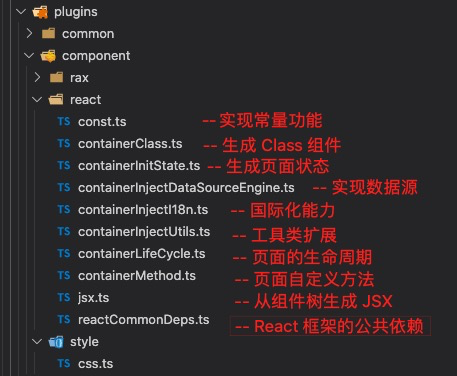
You can add your own plugins or replace default built-in plugins to implement custom functionality. For convenience, the code generation module also provides scaffolding for custom code generation solutions. Run the following script to generate a custom solution:
npx @rchh/lowcode-code-generator init-solution <your-solution-name>
It includes an example plugin (in src/plugins/example.ts). Follow the comments to complete related plugins and compose your custom code generation solution (src/index.ts). You can publish your solution as an npm package and use it according to usage options 1–4 above.