Material Parser Module Design
Introduction
The material parser module handles material integration. It automatically scans and parses source components and produces a JSON Schema that conforms to the Mid/Back-Office Low-Code Component Description Protocol. This schema includes basic information and property descriptions. The low-code engine uses them at runtime to automatically generate a configure configuration for the settings panel.
npm package and repository
- npm package: @rchh/lowcode-material-parser
- Repository: https://github.com/alibaba/lowcode-engine, subdirectory
modules/material-parser
Principles
The material parser uses a combined static and dynamic analysis approach. Dynamic analysis is strong on fidelity; static analysis is strong on detail. Both depend on properties defined in source code—if they are missing or wrong, parsing fails.
Overall flow
The process is roughly divided into five parts: localization, scanning, parsing, transformation, and validation, as shown below.

Static parsing
During static analysis, there are two cases: JS and TS.
Static parsing for JS
For JS, we extend react-docgen with custom resolvers and handlers. Resolvers find component definitions; handlers parse propTypes, defaultProps, and related information. The overall flow is shown below:
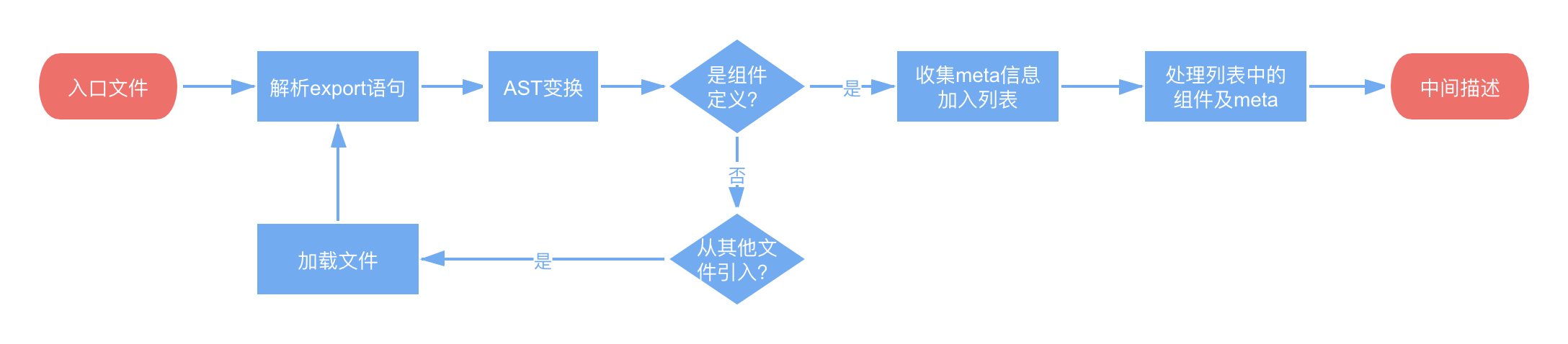
react-docgen uses Babel to generate an AST, then ast-types to traverse and find component nodes and property type definitions. Original react-docgen only parsed single files and could not parse IIFE, comma expressions, and similar structures (common in transpiled code). We extended it to recursively parse multiple files to find component definitions, unwrap IIFE, transform comma expressions for easier parsing, and add sub-component parsing for definitions like Button.Group = Group.
Static parsing for TS
For TS, we further split into TS source and TS compiled output. In TS source, React components have type signatures. In compiled TS, dts files (if any) contain full class/interface/type information. Component property descriptions can be obtained from these types. The overall flow is shown below:

react-docgen includes a TypeScript Babel plugin and can parse interfaces, but with limits: Babel parses TS but does not type-check; type handling is done by react-docgen, which handles extends/implements/utility types poorly and has no type inference. We could extend it, but in this case TypeScript Compiler is the better choice. We found typescript-react-docgen, which depends on TypeScript and outputs data in the same format as react-docgen, so we parse based on it.
TypeScript Compiler recursively parses all types referenced in a file, provided types are defined or installed. typescript-react-docgen calls TypeScript Compiler APIs, gets types emitted per file, and checks whether each is a React component. Something is treated as a React component if:
- Its function signature has one parameter, or the first parameter is named
props(functional component); - Its
constructorreturn value includes apropsproperty (stateful component).
Then it traverses the component's props type and gets each property's type signature string, such as (a: string) => void. typescript-react-docgen solves react-docgen's TypeScript parsing issues, but each type is represented as a string, which is hard to parse later. We extended it to recursively parse each layer of property values. We also improved functional component detection by checking whether the return type is ReactElement.
Below are special cases.
Circular definitions
TypeScript types can be circular, such as this JSON type:
interface Json {
  [x: string]: string | number | boolean | Json | JsonArray;
}
type JsonArray = Array<string | number | boolean | Json | JsonArray>;
Because the low-code component description protocol has no reference feature and references are awkward in the UI, circular definitions need not be fully parsed. When circular definitions are detected, the material parser simplifies the type to object. For special types such as JSON, you can edit them with the corresponding setter.
Complex types
TypeScript Compiler expands union types fully—for example, boolean | string becomes true | false | string, which is unnecessarily precise; we only need boolean | string. That example is easy to restore, but for types like React.ButtonHTMLAttributes<any> & {'data-name': string}, it expands all properties from ButtonHTMLAttributes together with data-name, making them indistinguishable and leaving only the expanded form. Those 100+ properties would be a nightmare in the settings panel, so the result is simplified to object. Even without {'data-name': string}, ButtonHTMLAttributes has no dedicated setter and is also simplified to object.
Dynamic parsing
When static parsing cannot parse a component, dynamic parsing is used.
The overall flow is shown below:

The idea is simple: require the component, then read propTypes and defaultProps on the component class. We use the parse-prop-types library. It must be required before the component because it patches prop-types, attaching types such as string and number to each PropTypes function, then traverses. Dynamic parsing can extract full type information because PropTypes may reference dependent component types, which is hard or costly in static parsing but is handled at runtime.
Technical details
Some JS files import CSS files, which is common internally. Such components fail without webpack, but webpack slows parsing significantly, so we use a sandbox to mock CSS-like files required in. We use vm2, which wraps Node's vm and can intercept require in files. Because parse-prop-types' patches fail in the sandbox, we also mock prop-types inside the component.
Overall diagram
Combining static and dynamic parsing flows above gives the following diagram.
