Renderer Module Design
Low-code rendering overview

How do we render a page from Schema and material components? This section describes that.
npm packages and repositories
- React framework renderer npm package: @rchh/lowcode-react-renderer
- Repository: https://github.com/alibaba/lowcode-engine, subdirectories:
- packages/renderer-core
- packages/react-renderer
- packages/react-simulator-renderer
Renderer framework principles
Overall architecture

- Protocol layer: Schema produced according to the Low-Code Engine Building Protocol Specification is our canonical protocol.
- Capability layer: provides core capabilities for rendering components, blocks, pages, etc., including prop parsing, style injection, conditional rendering, and more.
- Adapter layer: because runtime frameworks differ, the adapter layer exposes framework differences through interfaces so the renderer layer can register/adapt required methods. This connects the renderer and capability layers independently and extensibly.
- Renderer layer: provides core rendering methods. Because runtime frameworks expose different rendering APIs, they are injected through the adapter layer by implementing the required adapter interfaces.
- Application layer: applies renderer methods in projects to render applications, pages, and blocks at the appropriate scale.
Core parsing
This section focuses on the adapter layer and renderer layer in the architecture above.
Adapter layer
The adapter layer provides differences between frameworks. For example, React.createElement and Rax.createElement differ, so the adapter layer normalizes APIs.
React
import { createElement } from 'react';
import { adapter } from '@ali/lowcode-renderer-core';

adapter.setRuntime({
  createElement,
});
Rax
import { createElement } from 'rax';
import { adapter } from '@ali/lowcode-renderer-core';

adapter.setRuntime({
  createElement,
});
Then createElement used in the core layer automatically adapts to the runtime methods required by the framework based on which renderer is used.
Required methods include:
setRuntime: set runtime-related methodsComponent: component class, similar to React'sComponent.PureComponent: component class, similar to React'sPureComponent.createContext: creates aContextobject. For example, when React renders a component subscribed to thisContext, the component reads the currentcontextvalue from the nearest matchingProviderin the tree.createElement: creates aComponentelement; in React, this creates a React element.forwardRef: ref forwarding. Ref forwarding is optional and lets some components receive a ref and pass it down to child components.findDOMNode: accesses the underlying DOM node. If the component is mounted, this returns the corresponding native DOM element in the browser.
setRenderersPageRenderer: page rendering. You can customize page rendering lifecycle, navigation, routing, etc.ComponentRenderer: component rendering.BlockRenderer: block rendering.
Renderer layer
React Renderer
The internal stack is React. Most adapter APIs are designed around React, so React Renderer needs little extra work.
React Renderer has little code; it mainly registers React APIs with the adapter layer.
import React, {
  Component,
  PureComponent,
  createElement,
  createContext,
  forwardRef,
  ReactInstance,
  ContextType,
} from 'react';
import ReactDOM from 'react-dom';
import {
  adapter,
  pageRendererFactory,
  componentRendererFactory,
  blockRendererFactory,
  addonRendererFactory,
  tempRendererFactory,
  rendererFactory,
  types,
} from '@ali/lowcode-renderer-core';
import ConfigProvider from '@alifd/next/lib/config-provider';

window.React = React;
(window as any).ReactDom = ReactDOM;

adapter.setRuntime({
  Component,
  PureComponent,
  createContext,
  createElement,
  forwardRef,
  findDOMNode: ReactDOM.findDOMNode,
});

adapter.setRenderers({
  PageRenderer: pageRendererFactory(),
  ComponentRenderer: componentRendererFactory(),
  BlockRenderer: blockRendererFactory(),
  AddonRenderer: addonRendererFactory(),
  TempRenderer: tempRendererFactory(),
  DivRenderer: blockRendererFactory(),
});

adapter.setConfigProvider(ConfigProvider);
Rax Renderer
Most Rax APIs align with React; differences are mainly in overridden methods.
import { Component, PureComponent, createElement, createContext, forwardRef } from 'rax';
import findDOMNode from 'rax-find-dom-node';
import {
  adapter,
  addonRendererFactory,
  tempRendererFactory,
  rendererFactory,
} from '@ali/lowcode-renderer-core';
import pageRendererFactory from './renderer/page';
import componentRendererFactory from './renderer/component';
import blockRendererFactory from './renderer/block';
import CompFactory from './hoc/compFactory';

adapter.setRuntime({
  Component,
  PureComponent,
  createContext,
  createElement,
  forwardRef,
  findDOMNode,
});

adapter.setRenderers({
  PageRenderer: pageRendererFactory(),
  ComponentRenderer: componentRendererFactory(),
  BlockRenderer: blockRendererFactory(),
  AddonRenderer: addonRendererFactory(),
  TempRenderer: tempRendererFactory(),
});
Multi-mode rendering
Preview mode rendering
Preview mode rendering mainly uses Schema and components to achieve page rendering as described above.
import ReactRenderer from '@ali/lowcode-react-renderer';
import ReactDOM from 'react-dom';
import { Button } from '@alifd/next';

const schema = {
  componentName: 'Page',
  props: {},
  children: [
    {
      componentName: 'Button',
      props: {
        type: 'primary',
        style: {
          color: '#2077ff',
        },
      },
      children: 'OK',
    },
  ],
};

const components = {
  Button,
};

ReactDOM.render(
  <ReactRenderer schema={schema} components={components} />,
  document.getElementById('root'),
);
Design mode rendering (Simulator)
Design mode rendering is the process of rendering the building protocol produced by orchestration into an interactive view. It must handle internal data flow, lifecycle, event binding, internationalization, and more. Also called canvas rendering, the canvas is the core of UI orchestration. It usually combines page rendering with component/block drag, selection, and quick configuration.
Canvas rendering differs from preview rendering because the canvas interacts with the designer. We add a Simulator layer as the connector between designer and renderer.
Simulator converts the designer's DocumentModel and component/library descriptions into the corresponding Schema and component classes, then calls the renderer layer to render. Below is an overview of its capabilities.
Overall architecture

Project: top-level Project that holds references to all document models for importing and exporting application-level Schema.Document: the document model includes Simulator and data model parts. Simulator communicates with the data model via a Simulator Host protocol so UI actions on the canvas drive data model changes. Multi-document design and multi-tab interaction support designing multiple pages at once and building/configuring application properties in one browser tab.Simulator: the simulator mainly hosts page rendering for a specific runtime environment and communication with the model layer.Node: the node model abstracts visual components/blocks, holds references to the component prop collection Props, and wraps APIs for components such as modify, edit, save, drag, copy, etc.Props: describes all "designable" properties of the current component and provides methods to operate, traverse, and modify properties, while keeping a reference to each individual Prop.Prop: the prop model maps to one concrete property of the current visual component/block and provides APIs to change that property.Settings: a collection ofSettingFields.SettingField: connects property settersSetterwith prop modelsProp; key to batch property editing across multiple nodes.- General interaction model: built-in drag, active tracking, hover detection, clipboard, scroll, and hotkey binding.
Simulator overview
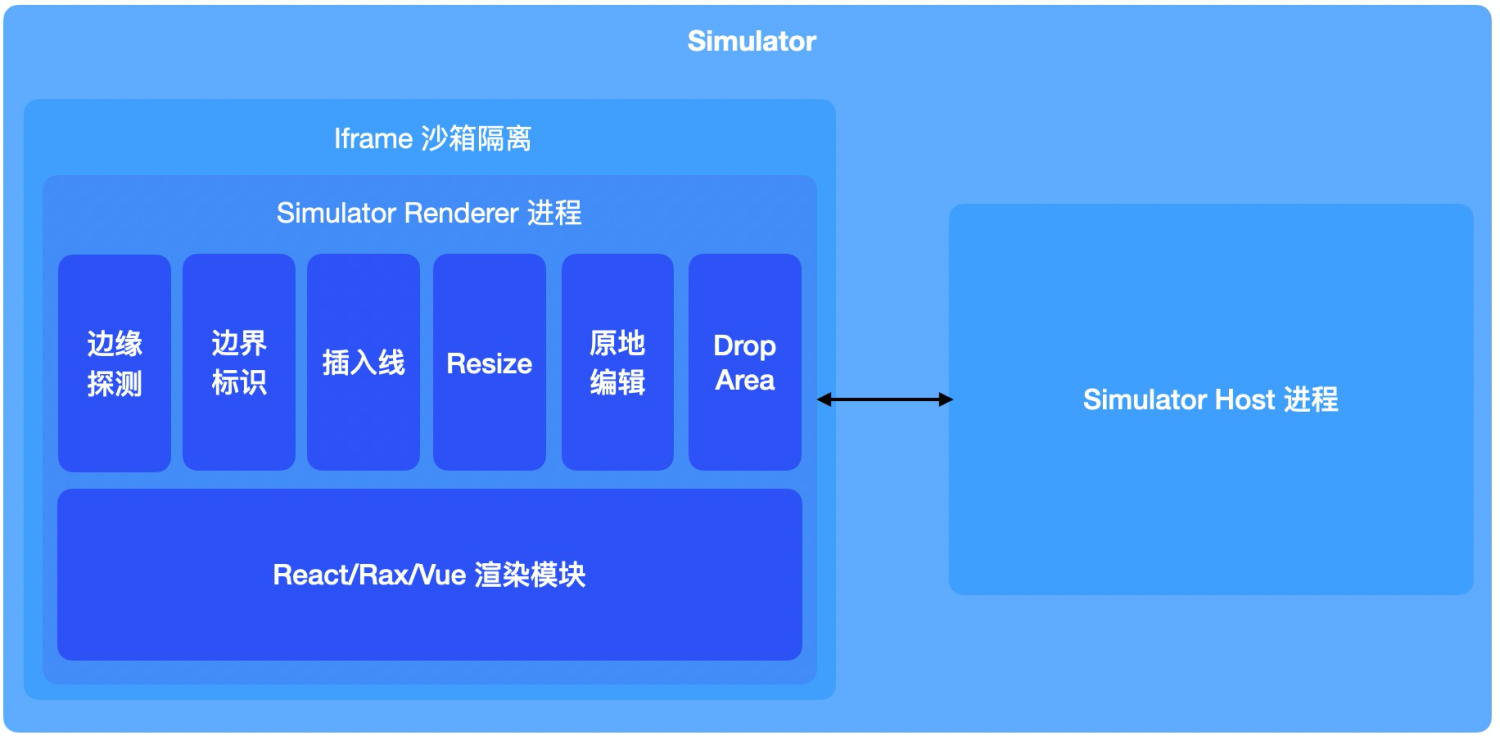
- Runtime environment: today we have React and Rax ecosystems. Going forward we will also support Vue, Angular, and others.
- Layout mode: unlike C-side marketing page building, mid/back-office scenarios are mostly forms and tables, where flow layout is mainstream. Designers and product teams may need absolute layout for page development.
- Development scenarios: low-code building includes not only page orchestration but also logic orchestration and business orchestration.
Based on these considerations, we use sandbox-isolated simulator technology for multi-runtime (React, Rax, mini programs, Vue), multi-mode (flow layout, free layout), and multi-scenario (page orchestration, graph orchestration) UI building. By registering renderer modules for different runtimes, the editor can move from React page building to Rax page building. By registering different simulator canvases, you can build graph orchestration on G6 or mxGraph. You can customize a flow-layout canvas or a free-layout canvas.