Asset Bundle Management
Introduction
From the previous introduction, you should understand how to use Parts to quickly integrate existing React components into the low-code engine and produce low-code components.
During use, you may want built asset bundles to remain accessible for download, or want component version information persisted and maintainable by multiple people when building asset bundles.
The Asset Bundle management feature in Parts helps solve this problem.

Create an Asset Bundle
First, in the My Asset Bundles tab, click Create Asset Bundle.

- Enter the asset bundle name
- Configure asset bundle administrators. Administrators have full permissions on the asset bundle. The creator is the default administrator; you can add others as administrators.
- Configure asset bundle description (optional)
- Click Confirm to complete asset bundle creation
Next, add one or more components to the asset bundle.
Add Components
Step 2: After creating the asset bundle, you can add components to it. In the new asset bundle flow, the component configuration dialog opens automatically after creation. You can also open it by clicking the asset bundle card.

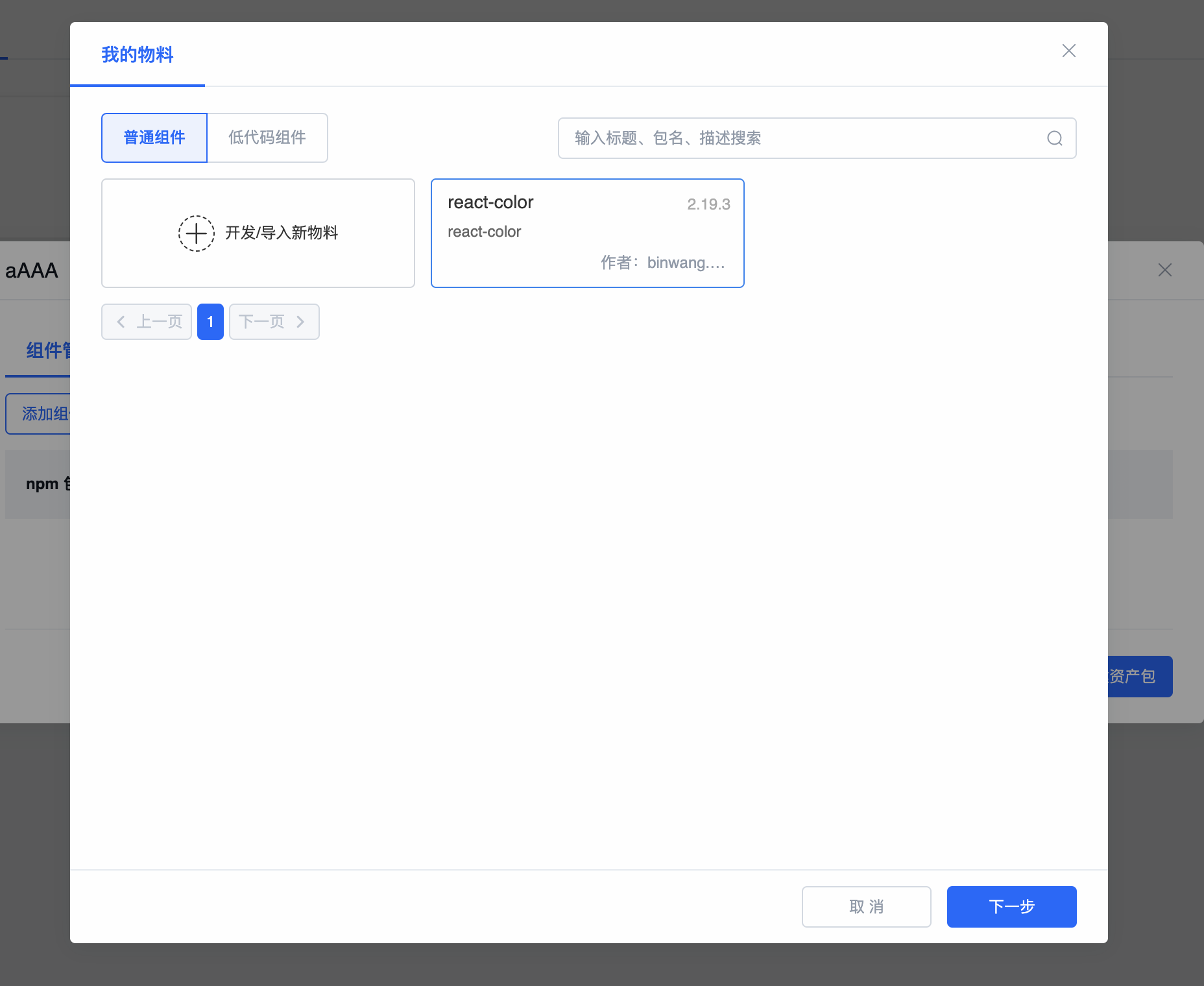
- Click the Add Component button in the dialog. In the component selection panel, select the components to add and click Next.
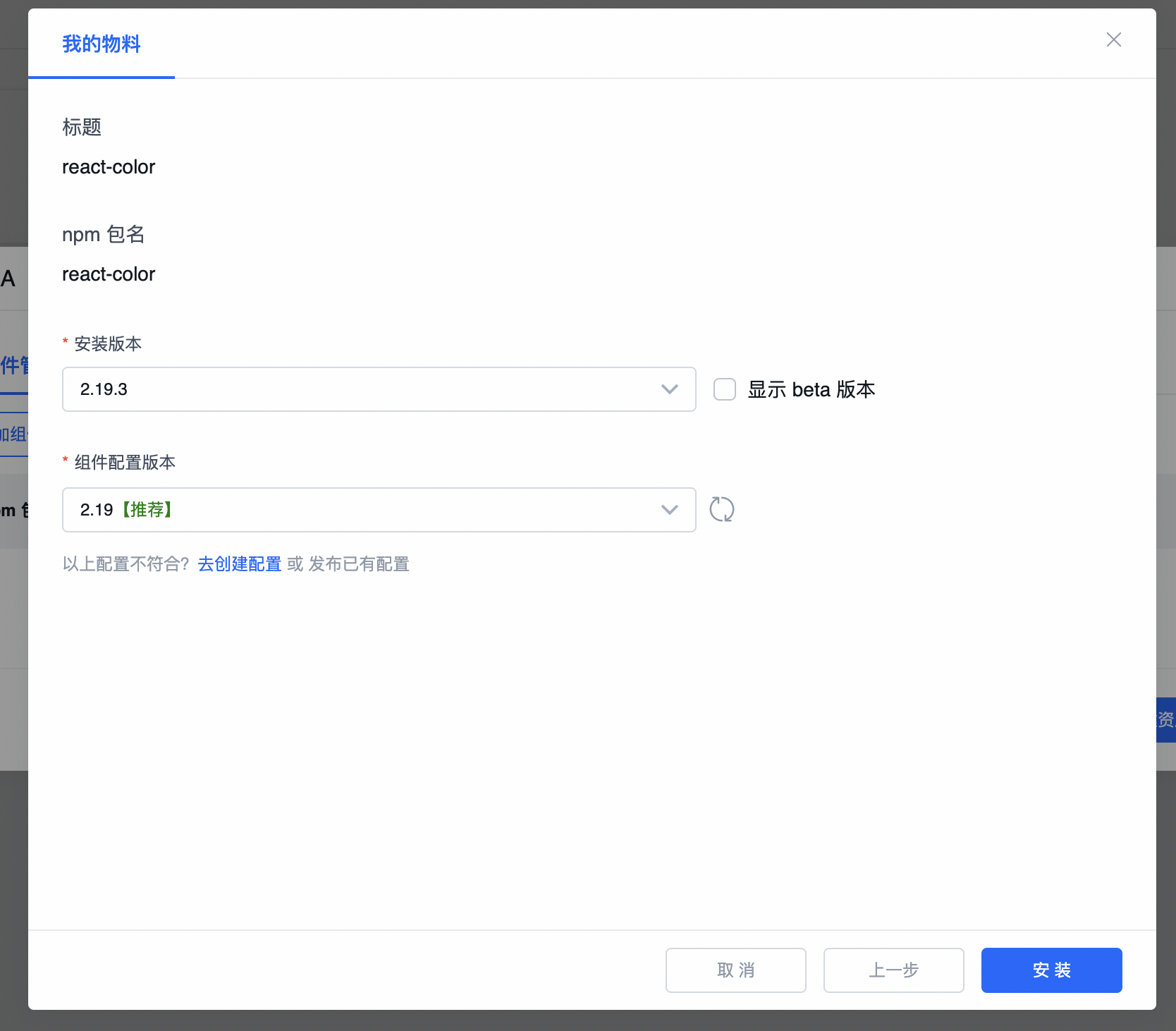
- On the component version and description protocol version selection screen, choose the correct versions and click Install to complete adding a component.
Build Asset Bundle
After adding components, click Save and Build Asset Bundle to open the asset bundle build configuration dialog.

- Enable cache: Leverage previous build result cache to accelerate asset bundle generation. Each component's build result is cached with package name and version as the key.
- Task description: Description information for the current build task.
Click Confirm to automatically navigate to the asset bundle build history page:
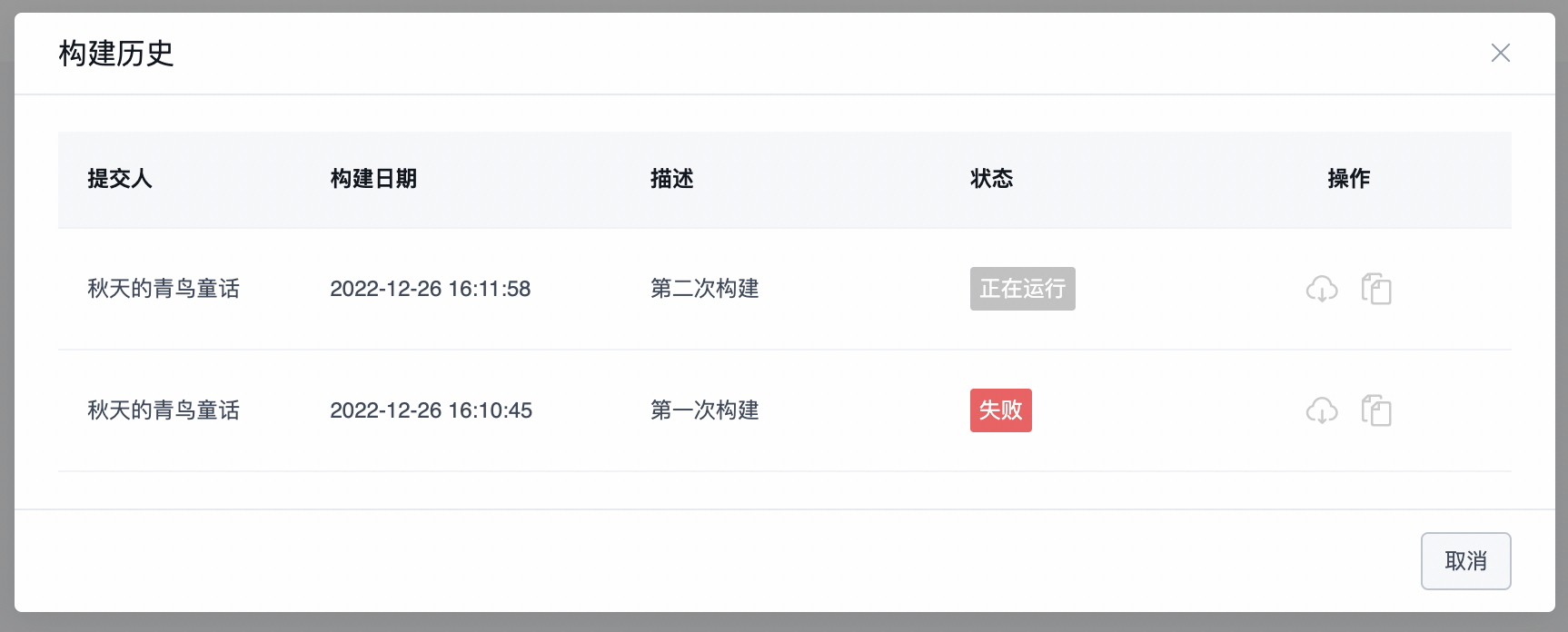 The build history page shows all build history for the current asset bundle. The status column shows build status: Success, Failed, or Running. The actions column allows copying or downloading the asset bundle result when the build succeeds.
Using an Asset Bundle
You can reference it directly in lowcode-demo by replacing the demo's original asset bundle file. For example, in demo-lowcode-component, replace assets.json with your asset bundle file to quickly use your own materials.
Using an Asset Bundle in the Editor
When using an asset bundle containing low-code components, note that the engine version must be >= 1.1.0-beta.9.
Then simply replace the assets.json file in lowcode-demo.
Using an Asset Bundle in Preview
The overall approach for using an asset bundle in preview is to extract and transform the React component list required by ReactRenderer (the components parameter) from the asset bundle, then pass schema and components to ReactRenderer for rendering. During asset bundle transformation, low-code components must also be converted to React components. See the implementation in src/parse-assets.ts in demo-lowcode-component.
The overall preview logic based on an asset bundle: See details:
import ReactDOM from 'react-dom';
import React, { useState } from 'react';
import { Loading } from '@alifd/next';
import ReactRenderer from '@rchh/lowcode-react-renderer';
import { createFetchHandler } from '@rchh/lowcode-datasource-fetch-handler';
import { getProjectSchemaFromLocalStorage } from './services/mockService';
import assets from './services/assets.json';
import { parseAssets } from './parse-assets';

const getScenarioName = function () {
  if (location.search) {
    return new URLSearchParams(location.search.slice(1)).get('scenarioName') || 'index';
  }
  return 'index';
};

const SamplePreview = () => {
  const [data, setData] = useState({});
  async function init() {
    const scenarioName = getScenarioName();
    const projectSchema = getProjectSchemaFromLocalStorage(scenarioName);
    const { componentsMap: componentsMapArray, componentsTree } = projectSchema;
    const schema = componentsTree[0];
    const componentsMap: any = {};
    componentsMapArray.forEach((component: any) => {
      componentsMap[component.componentName] = component;
    });

    // IMPORTANT: parse all React components from the asset package
    const { components } = await parseAssets(assets);

    setData({
      schema,
      components,
    });
  }

  const { schema, components } = data;

  if (!schema || !components) {
    init();
    return <Loading fullScreen />;
  }

  return (
    <div className="lowcode-plugin-sample-preview">
      <ReactRenderer
        className="lowcode-plugin-sample-preview-content"
        schema={schema}
        // // Pass the React component list into ReactRenderer for rendering
        components={components}
        appHelper={{
          requestHandlersMap: {
            fetch: createFetchHandler(),
          },
        }}
      />
    </div>
  );
};

ReactDOM.render(<SamplePreview />, document.getElementById('ice-container'));
Logic for parsing the React component list from the asset bundle: See details:
import {
  ComponentDescription,
  ComponentSchema,
  RemoteComponentDescription,
} from '@rchh/lowcode-types';
import { buildComponents, AssetsJson, AssetLoader } from '@rchh/lowcode-utils';
import ReactRenderer from '@rchh/lowcode-react-renderer';
import { injectComponents } from '@rchh/lowcode-plugin-inject';
import React, { createElement } from 'react';

export async function parseAssets(assets: AssetsJson) {
  const { components: rawComponents, packages } = assets;
  const libraryAsset = [];
  const libraryMap = {};
  const packagesMap = {};
  packages.forEach((pkg) => {
    const { package: _package, library, urls, renderUrls, id } = pkg;
    if (_package) {
      libraryMap[id || _package] = library;
    }
    packagesMap[id || _package] = pkg;
    if (renderUrls) {
      libraryAsset.push(renderUrls);
    } else if (urls) {
      libraryAsset.push(urls);
    }
  });
  const assetLoader = new AssetLoader();
  await assetLoader.load(libraryAsset);
  let newComponents = rawComponents;
  if (rawComponents && rawComponents.length) {
    const componentDescriptions: ComponentDescription[] = [];
    const remoteComponentDescriptions: RemoteComponentDescription[] = [];
    rawComponents.forEach((component: any) => {
      if (!component) {
        return;
      }
      if (component.exportName && component.url) {
        remoteComponentDescriptions.push(component);
      } else {
        componentDescriptions.push(component);
      }
    });
    newComponents = [...componentDescriptions];

    // If remote component descriptions exist, load them into the asset package and fire designer.incrementalAssetsReady so the component panel refreshes
    if (remoteComponentDescriptions && remoteComponentDescriptions.length) {
      await Promise.all(
        remoteComponentDescriptions.map(async (component: any) => {
          const { exportName, url, npm } = component;
          await new AssetLoader().load(url);
          function setAssetsComponent(component: any, extraNpmInfo: any = {}) {
            const components = component.components;
            if (Array.isArray(components)) {
              components.forEach((d) => {
                newComponents = newComponents.concat(
                  {
                    npm: {
                      ...npm,
                      ...extraNpmInfo,
                    },
                    ...d,
                  } || [],
                );
              });
              return;
            }
            newComponents = newComponents.concat(
              {
                npm: {
                  ...npm,
                  ...extraNpmInfo,
                },
                ...component.components,
              } || [],
            );
          }

          function setArrayAssets(
            value: any[],
            preExportName: string = '',
            preSubName: string = '',
          ) {
            value.forEach((d: any, i: number) => {
              const exportName = [preExportName, i.toString()].filter((d) => !!d).join('.');
              const subName = [preSubName, i.toString()].filter((d) => !!d).join('.');
              Array.isArray(d)
                ? setArrayAssets(d, exportName, subName)
                : setAssetsComponent(d, {
                    exportName,
                    subName,
                  });
            });
          }
          if (window[exportName]) {
            if (Array.isArray(window[exportName])) {
              setArrayAssets(window[exportName] as any);
            } else {
              setAssetsComponent(window[exportName] as any);
            }
          }
          return window[exportName];
        }),
      );
    }
  }
  const lowcodeComponentsArray = [];
  const proCodeComponentsMap = newComponents.reduce((acc, cur) => {
    if ((cur.devMode || '').toLowerCase() === 'lowcode') {
      lowcodeComponentsArray.push(cur);
    } else {
      acc[cur.componentName] = {
        ...(cur.reference || cur.npm),
        componentName: cur.componentName,
      };
    }
    return acc;
  }, {});

  function genLowCodeComponentsMap(components) {
    const lowcodeComponentsMap = {};
    lowcodeComponentsArray.forEach((lowcode) => {
      const id = lowcode.reference?.id;
      const schema = packagesMap[id]?.schema;
      const comp = genLowcodeComp(schema, { ...components, ...lowcodeComponentsMap });
      lowcodeComponentsMap[lowcode.componentName] = comp;
    });
    return lowcodeComponentsMap;
  }
  let components = await injectComponents(buildComponents(libraryMap, proCodeComponentsMap));
  const lowCodeComponents = genLowCodeComponentsMap(components);
  return {
    components: { ...components, ...lowCodeComponents },
  };
}

function genLowcodeComp(schema: ComponentSchema, components: any) {
  return class LowcodeComp extends React.Component {
    render(): React.ReactNode {
      return createElement(ReactRenderer, {
        ...this.props,
        schema,
        components,
        designMode: '',
      });
    }
  };
}
Contact Us