StyleSetter
Overview
By enabling StyleSetter, you can configure style properties through a style configuration panel.
Display
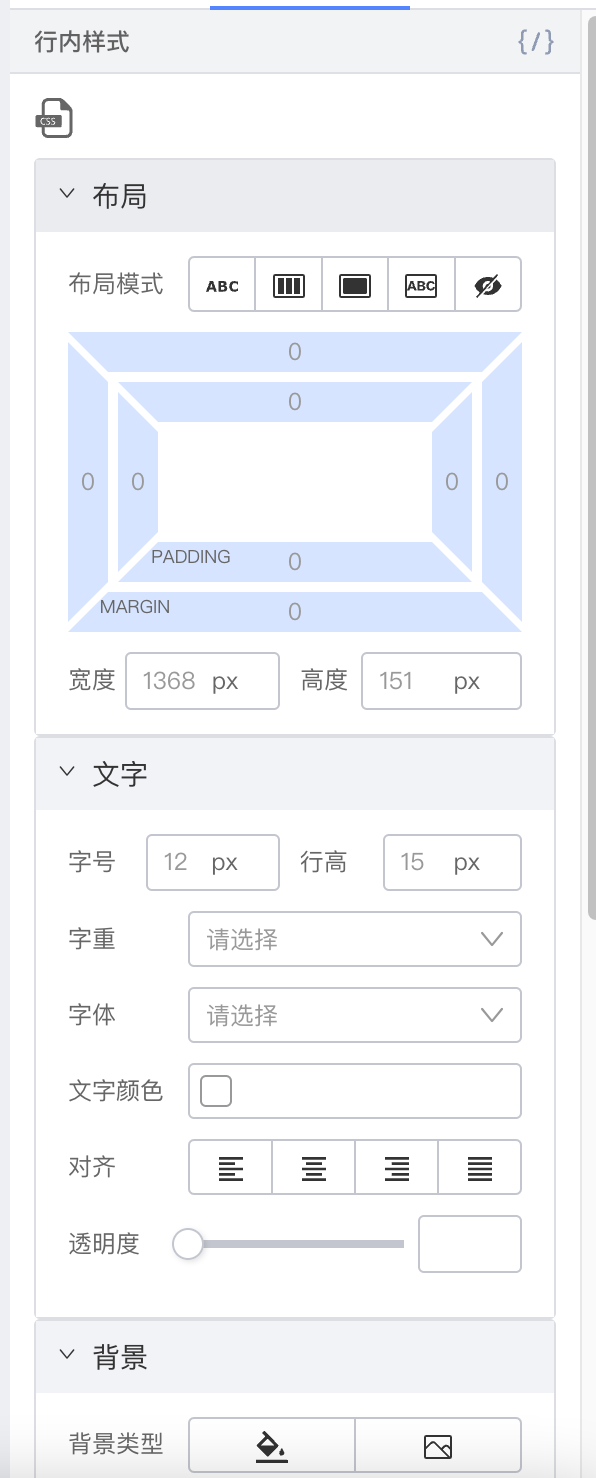
Setter Configuration
| Property | Type | Description | |
|---|---|---|---|
| unit | String | Default value: px  | |
| placeholderScale | Number | Default computed size scale. Default value: 1  When no value is set, the system computes the displayed value via When no value is set, the system computes the displayed value via window.getComputedStyle. In some scenarios, such as mobile, the editor may show a width of 375 while the design width is 750 — in that case, set this scale to 2. | |
| showModuleList | String[] | Default value: ['background', 'border', 'font', 'layout', 'position']. Corresponds to the five sections: background, border, text, layout, and position. Show or hide sections as needed for your scenario. For example, for a text component that does not need border styling, you can hide the border module. | |
| isShowCssCode | Boolean | Default value: true. Whether to show CSS source editing. | |
| layoutPropsConfig | Object | Layout style settings | |
| layoutPropsConfig.showDisPlayList | String[] | Default value: ['inline', 'flex', 'block', 'inline-block', 'none']  Show as needed Show as needed | |
| layoutPropsConfig.isShowPadding | String | Default value: true  Whether to show padding (all four sides) Whether to show padding (all four sides) | |
| layoutPropsConfig.isShowMargin | Boolean | Default value: true  Whether to show margin (all four sides) Whether to show margin (all four sides) | |
| layoutPropsConfig.isShowWidthHeight | Boolean | Default value: true  Whether to show width and height Whether to show width and height | |
| fontPropsConfig | Object | Text style settings | |
| fontPropsConfig.fontFamilyList | Array | [ { value: 'Helvetica', label: 'Helvetica' }, { value: 'Arial', label: 'Arial' },] Customize font family options | |
| positionPropsConfig | Object | Position style settings | |
| positionPropsConfig.isShowFloat | Boolean | Default: true. Whether to show float | |
| positionPropsConfig.isShowClear | Boolean | Default: true. Whether to show clear float |